

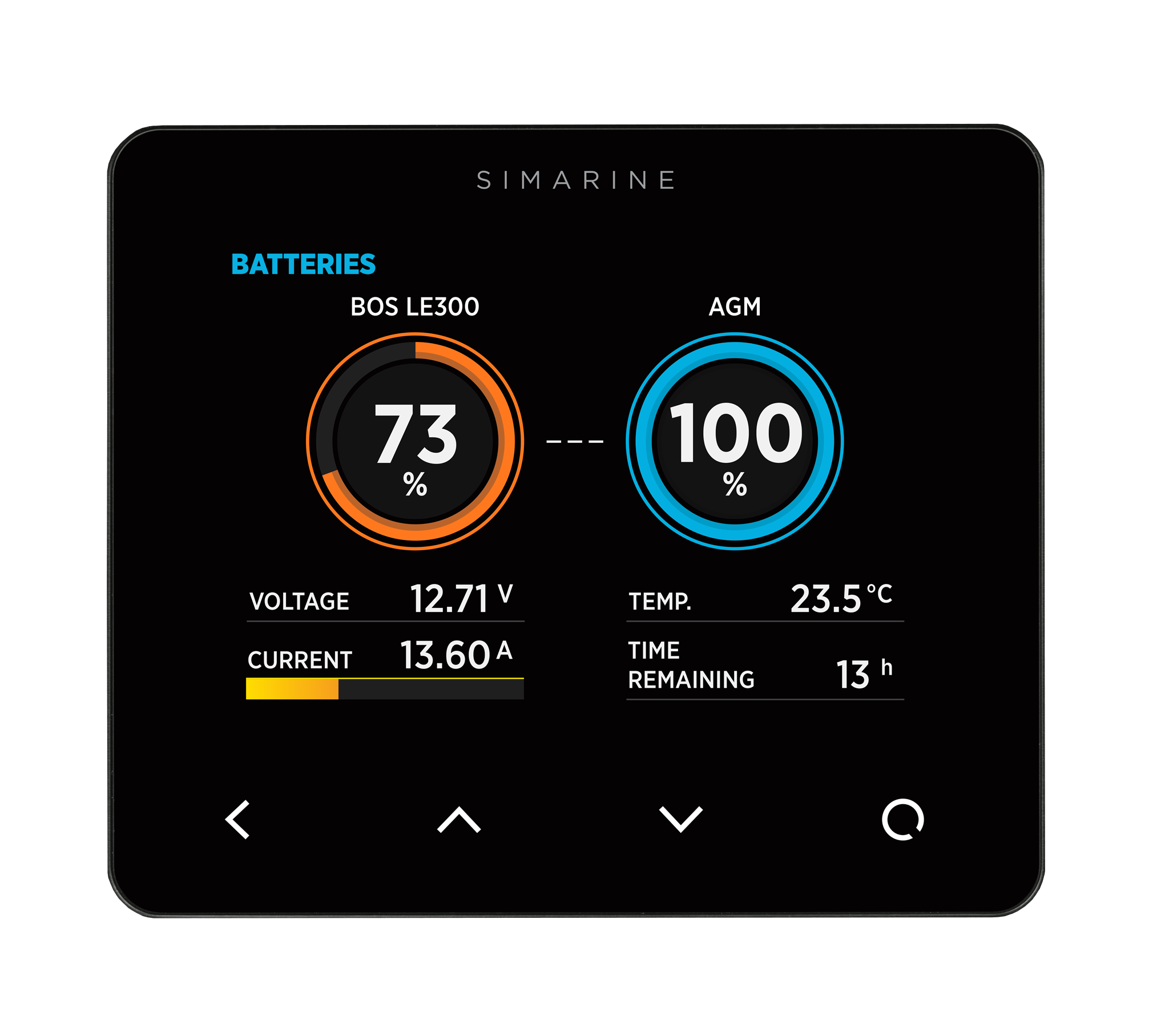
LE300 Monitoring Set mit Simarine Pico


- Release date:
- January 2026
- Last revision:
- 18. August 2026
Table of Contents
Package contents
- Simarine PICO Batteriemonitor
- Simarine Shunt SC303
- Communication cable Simarine-LE300 (98906301)
Additional components required
- BOS LE300 Lithium extension battery
- Lead-acid battery
- Wiring tools and accessories
Compatible components
- Simarine Shunt SC503
- Simarine Nereide 2
General Information
This guide explains how to properly connect your BOS battery pack to a Simarine PICO monitoring system using a Simarine shunt. It includes integration with a lead-acid battery and outlines how to monitor system voltages and consumption.
Safety instructions
- Please read and understand the whole user manual before installation and usage.
- Do NOT mix up the + (plus) and – (minus) poles of the battery.
- Do NOT connect anything to a damaged battery. It could heat up, catch fire or explode.
- Keep the device within the defined temperature range.
- Install this device step by step as written in this manual for best results.
- After installation, the device needs to be fully charged.
- Follow all safety precautions during installation of device & handling batteries.
- Improper handling of batteries may introduce a risk of battery explosion.
- Keep batteries away from children & animals.
- During handling of batteries no smoking or exposure to fire.
- Wear eye protection during installation process.
- When working with a battery remove all personal metal items like watches, rings, necklaces and bracelets. Metal items in contact with the battery terminals might cause a short circuit with a very high electric current, which may heat up and melt nearby objects and cause severe burns. If you need to use metallic tools, they must be properly insulated.
- Keep the battery away from paper clips, coins, keys, nails, screws or other small metal objects, that can make a connection from one terminal to another. Shorting the battery-pack terminals together may cause burns or a fire, even though the battery has internal short circuit protection functionalities. For short-circuiting damage caused in this manner, any and all warranty claims shall be invalid.
- Use electrically insulated tools for connecting cables.
- The mounting and the electrical connection may only be carried out by trained specialists.
- Incorrect operation can damage system components.
- Factory labels and markings must never be altered, removed or rendered unreadable.
- This device contains sensitive electronics, so take care during installation and use.
- Consider all relevant official safety instructions during transportation of the device. Safety instructions might vary depending on the mode of transport and on local country regulations.
- Check the recycling information at the end of the user manual for disposal of device
- Only connect to 12 VDC batteries of the following types:
- Lead storage batteries with liquid electrolytes
- Sealed lead acid batteries – GEL or AGM
- Use the device only in combination with a lead acid battery and a lead acid charge controller, do NOT connect loads or power sources directly to the lead acid battery.
- The device must not be connected to a lead acid battery if it has a damaged casing.
- Lead acid batteries can generate explosive gases during operation. Never smoke, allow flames or sparks near the battery. Make sure to keep sufficient ventilation around the battery and read the lead acid battery user manual.
- Do NOT use with nickel cadmium batteries, nickel metal hydride batteries or other battery types.
Overview
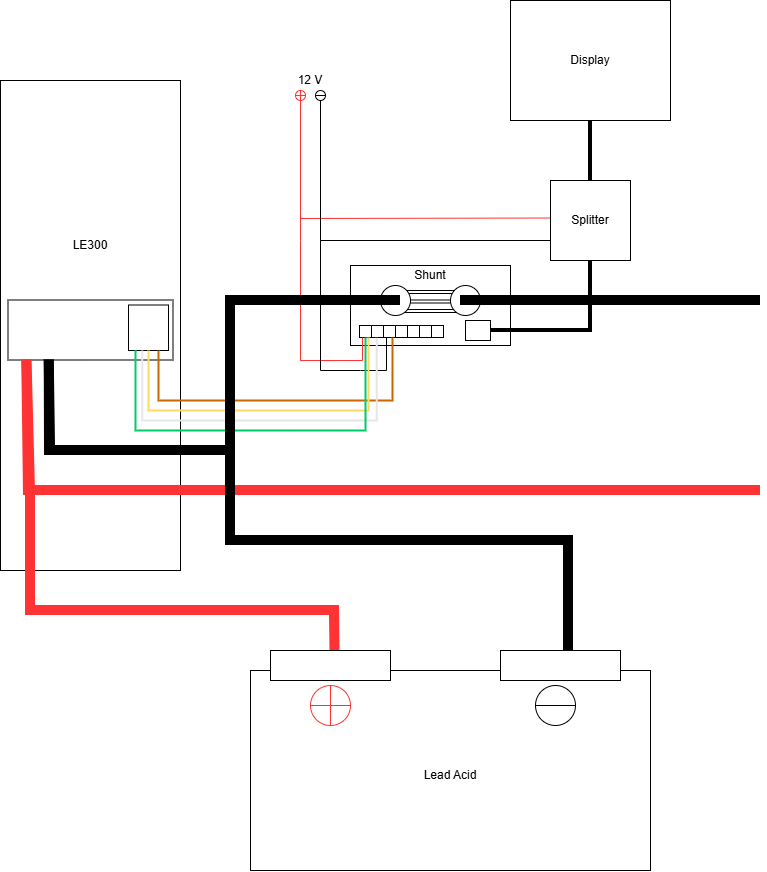
• The BOS LE300 battery is connected directly to the lead-acid battery (in parallel).
• The Simarine shunt is used to measure current consumption from the lead-acid battery.
• The BOS battery’s 0–10V status signal is connected to the Simarine system for SoC (state of charge) monitoring.
Installation
1. Connect the BOS Communication cable
Plug the BOS Communication cable Simarine-LE300 (98906301) into the communication port of one BOS LE300 battery. It does not matter which LE300 module the communication cable is connected to (it is recommended to use the first or last battery in the block).
Only one battery in the BOS system needs to provide the communication signal. All other LE300 modules communicate with each other. For this to work, the modules must be looped through, i.e. all LE300 modules are connected to each other via communication cables. However, a single cable is sufficient for the external connection. As a standard, LE300 batteries are delivered in blocks in which the individual modules are already pre-wired and connected via communication cables. Additional communication cables are only required if several blocks are combined with each other.
2. Power the Communication Logic
To enable the BOS battery’s internal communication system:
• Red wire → connect to a 12V positive supply.
• Brown wire → connect to ground (GND).
This provides power for the BOS battery to transmit its state of charge via a 0–10V signal.
3. Connect BOS Signal to the Simarine Shunt
To send the BOS battery’s 0–10V signal to the Simarine PICO system:
• Green wire (from BOS harness) → connect to VOLTAGE port on the Simarine shunt.
• Brown wire (ground) → connect to the GND port on the Simarine shunt.
Ensure the red wire remains connected to 12V; this signal line does not power the BOS battery itself, only its communication logic.
4. BOS LE300 Connection to Lead-Acid Battery
Connect the BOS battery pack directly in parallel with the lead-acid battery:
BOS positive → Lead-acid positive
BOS negative → TO SYSTEM on SIMARINE SHUNT
5. Monitor Lead-Acid Battery Voltage (Optional)
To monitor the lead-acid battery voltage independently:
Run a wire from the positive terminal of the lead-acid battery to the VOLTAGE port on the Simarine shunt.
This enables voltage monitoring of your main battery bank.
6. Measure Power Consumption from DC Loads
To measure current drawn by consumers (e.g., lights, pumps):
• Connect the “TO BATTERY” side of the Simarine shunt to the negative terminal of the lead-acid battery.
• Connect the “TO SYSTEM” side of the shunt to the negative bus for your DC loads.
All DC consumers must draw power through this shunt to enable accurate current measurement.
Setting up the software
Before proceeding, ensure that the PICO is powered on and the shunt is properly connected.
Step-by-Step Instructions:
1. Access the Menu:
Press and hold the right button on the PICO until the MENU appears.
2. Navigate to Battery Setup:
Go to: DEVICES → BATTERIES → ADD NEW
3. Configure Battery Type:
Select your type of battery.
Then choose: VOLTMETER ON SHUNT OF LEAD ACID BATTERY.
In the AMMMETER setting select the SHUNT AMMETER
4. Enter Advanced Settings:
Scroll down to ADVANCED SETTINGS.
Under EXTENSION BATTERY, select BOS-LE300.
Navigate to BOS-LE300 settings.
5. Set State of Charge (SOC) Source:
Select: VOLTMETER ON SHUNT OF BOS BATTERY FOR SOC.
Input the number of BOS-LE300 battery modules connected.
6. Finish Setup:
Return to the Home Screen to complete the setup.