
Battery S Hub S 60A
Installation & User Manual
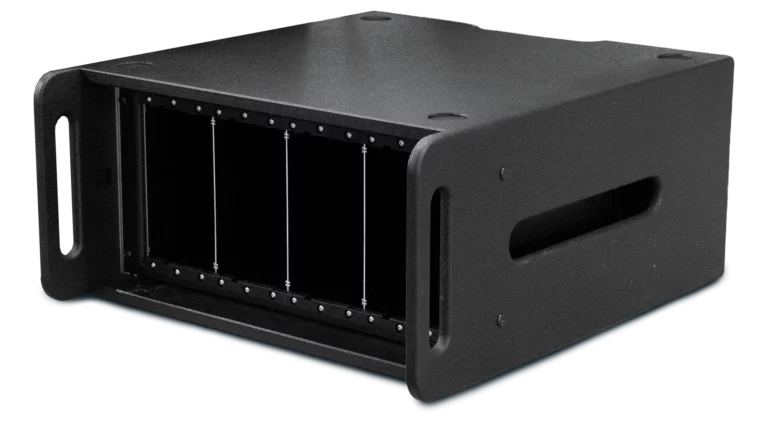
Product name: Battery S Hub S
- Release date:
- June 2025
- Last revision:
- 15. June 2026
Package contents
- Battery Hub S
- PowerCON cable(1,5m)
Product Description
Thank you for choosing a quality product from BOS Balance of Storage Systems AG. The Battery S Hub S is a stationary charging station for up to four Battery S battery modules.
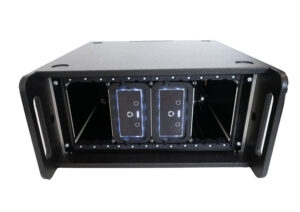
The device consists of a module rack with an integrated Frame S for the secure installation of the Battery S, integrated charging electronics, and an appliance inlet (IEC 60320 C14) with main switch and fuse. Power is supplied via the public 230 V AC grid.
The Battery S Hub S is intended exclusively for use with original Battery S battery modules from BOS AG. In case of technical issues or comments, please contact your BOS distributor or BOS AG directly.
Table of Contents
Symbol & Signal Word legend
The following signal words are used in this manual:
| DANGER | Immediate hazard that will result in serious injury or death. |
| WARNING | Potential hazard that could result in serious injury or death. |
| CAUTION | Potential hazard that may result in minor or moderate injury. |
| NOTICE | Possible property damage or important information. |
Safety instructions
- Please read and understand the whole user manual before installation and usage of the Battery Hub S.
- Use the device only in combination with the Battery S.
- Do NOT mix up the + (plus) and – (minus) poles of the battery.
- Do NOT open the battery pack. Danger of short-circuiting. Opening the BOS battery S device voids any and all warranty claims.
- Install this device step by step as written in this manual for best results.
- Follow all safety precautions during installation of device & handling batteries.
- The internal voltage of the device may be higher than the nominal level. Make sure to avoid electric shock during installation.
- Store this document in a secure location for the entire lifetime of the device. Ensure that it is handed over to any future owners or operators.
- Incorrect operation can damage system components.
- If the housing of the Hub S is damaged, the device must not be operated under any circumstances.
- Only use undamaged Battery S units with the Hub S.
- Factory labels and markings must not be altered, removed, or rendered unreadable.
- This device contains sensitive electronics, so take care during installation and use.
- Check the recycling information at the end of the user manual for disposal of device
Safe Handling of Battery S Modules
- Do not connect any objects to a damaged battery module. It may overheat, catch fire, or explode.
- Operate the device within the specified temperature range (see technical data).
- Do not smoke or expose the Battery S to open flames during handling.
- Wear eye protection and safety shoes during installation and insertion of the Battery S (risk of crushing).
- Remove all personal metal objects (watches, rings, necklaces, bracelets) when working with battery modules.
- Keep the Battery S away from paper clips, coins, keys, nails, screws, or other small metal objects that could cause a connection between the terminals.
Application Scope
The Battery Hub S is intended exclusively for stationary charging of up to four Battery S modules.
The device is designed for use in indoor environments and dry conditions.
Failure to follow the safety instructions may result in damage to the device and the connected Battery S modules.
Improper use of the product or failure to follow the operating instructions will void the warranty and guarantee.
Scope of Delivery
- 1× Battery Hub S (TTN: 98906335)
- 1× Power cable (IEC 60320 C13/C14), length 1.5 m (TTN: 98906354)
- This user manual (digital, available at manual.bos-ag.com)
Any visible defects or transport damage must be reported to the dealer in writing within 7 working days after delivery
(standard practice according to §377 HGB for commercial transactions); hidden defects must be reported immediately upon discovery.
Note: Battery S modules are not included in the scope of delivery and must be purchased separately.
Technical Data
| Input voltage |
| 230 V AC |
| Input current (max.) |
| 16 A (standard household circuit) |
| Frequency |
| 50 Hz |
| Charging current (total, DC) |
| 60 A |
| Charging voltage (DC) |
| 12 V |
| Number of simultaneously chargeable Battery S modules |
| 4 |
| Compatible battery modules |
| BOS Battery S swap 12 V / 80 Ah (TTN 98906163) |
| Protection class (VDE) |
| Class I (with protective earth connection) |
| Degree of protection (housing) |
| IP20 (indoor use, dry environment) |
| Pollution degree |
| 2 (indoor use) |
| Mains connection |
| Appliance inlet (IEC 60320 C14) with main switch and fuse |
| Fuse rating |
| T 10 A L 250 V AC (5 × 20 mm, slow-blow) |
| Operating temperature |
| 0 °C to +40 °C (conservative; factory-tested −20 °C to +50 °C) |
| Storage temperature |
| −20 °C to +50 °C |
| Relative humidity |
| max. 85% non-condensing |
| Maximum installation altitude |
| ≤ 2,000 m above sea level |
| Installation |
| Stationary, indoor use, on a level and stable surface |
| Housing material |
| Sheet steel, powder-coated |
| Dimensions (W × D × H) |
| 535 × 595 × 268 mm |
| Weight (without Battery S) |
| 21 kg |
Installation
Please read and understand our general information before starting the installation.
Structure
Housing
The Hub S is housed in a module rack that has been specifically designed for this application. The rack provides a stable and protected environment for all the components.

Batterie mounting
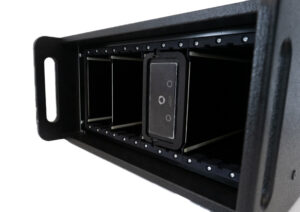
The Frame S is installed in the rack, accommodating up to four Battery S units with a precise fit and mechanically securing them — also suitable for transport.
Charging electronics
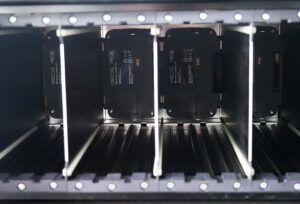
The charging electronics are mounted on a separate mounting plate in the rear section of the Hub S. They control the charging process of all installed Battery S units.
Mains connection
On the rear side of the housing, there is an IEC 60320 C14 inlet with an integrated main switch and fuse. Power is supplied via a 230 V AC source.
Installation Guidelines
- Install the Hub S as a freestanding unit on a level, stable surface (table or floor) — no wall or floor mounting required.
- Maintain a minimum clearance of 100 mm on all sides from walls, furniture, and flammable materials.
- Do not cover ventilation openings.
- Do not expose the device to direct sunlight and do not install it near heat sources.
- Stack a maximum of 2 Hub S units on top of each other (observe stability, ventilation, and maximum total weight).
Electrical Installation & Grounding
- Visually inspect the power cable, socket, fuse, and main switch for damage.
- Set the main switch on the Hub S to 0. Fully insert the device-side connector of the power cable.
- Connect the mains plug to a properly protected 230 V socket.
- Continuity test between PE connection and housing: resistance < 0.3 Ω (low-resistance measurement according to DIN VDE 0100-600).
- Insulation test between phase conductor and PE: > 1 MΩ at 500 V DC.
- Perform an RCD test on the supplying circuit.
Commissioning
- Check correct installation and ventilation clearances (see section Installation).
- Protective earth (PE) test successfully completed (see section Electrical Installation).
- Set the main switch on the Hub S to 0. Connect the power cable between the Hub S and a 230 V socket. Then switch the main switch to I.
- Insert up to four Battery S modules (see section Inserting Battery S) and check the status LEDs on each module.
- If commissioning is successful, the LEDs on the Battery S will light up — the charging process starts automatically.
- Perform a functional test by checking the status/LED indicators on the Hub S.
- Complete the commissioning report (see section Commissioning Checklist) and have it signed by the operator.
Commissioning Checklist
| # | Checkpoint | OK | Remarks |
|---|---|---|---|
| 1 | Installation location level, stable, and sufficiently ventilated | ☐ | |
| 2 | Housing undamaged, all labels legible | ☐ | |
| 3 | Circuit protected with RCD IΔN ≤ 30 mA | ☐ | |
| 4 | Protective earth connection established, R < 0.3 Ω | ☐ | |
| 5 | Insulation test > 1 MΩ | ☐ | |
| 6 | Power connector plugged in; main switch set to I; fuse intact | ☐ | |
| 7 | Battery S modules correctly inserted and locked (slots 1–4) | ☐ | |
| 8 | LED indicators on all inserted Battery S modules are active | ☐ | |
| 9 | Charging process starts (Battery S indicator active) | ☐ | |
| 10 | No unusual noises or odors | ☐ |
| System location: | |||
| Date of commissioning: | Qualified electrician: | ||
| Signature (installer): | Signature (operator): |
Operation
Inserting the Battery S
- Insert the Battery S into the guide rail as shown in the illustration. The locking lever must be foldable to the left.
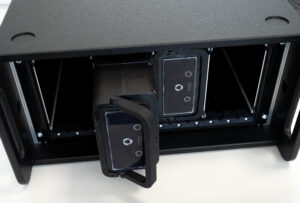
- Make sure the battery is positioned correctly (handle must be able to fold out from right to left).

- Use the handle to slide the battery into the holder until it reaches the stop. Secure it by tilting the handle to the right and locking it into place.
- When the Battery S is correctly inserted, the Battery S LEDs will illuminate.
Removing the Battery S
- Ensure that the charging process is complete (check LED status).
- Move the lever on the Battery S to the left to unlock it.
- Remove the Battery S from the Frame S using the lever.
Charging Process
- Up to four Battery S modules can be charged simultaneously.
- The Hub S automatically distributes the total charging current of 60 A among the inserted modules.
- Typical charging time: 5–6 hours for four fully discharged Battery S modules.
- Do not cover the Hub S during the charging process.
Status Indicators
The Battery Hub S itself has no dedicated status LEDs. The operating status is indicated exclusively by the LEDs of the inserted Battery S modules:
| Battery S LED indication | Meaning |
|---|---|
| LED solid green | Module correctly inserted, charging process active |
| LED flashing | Charging level reached or fault — see Battery S manual |
| LED off | Module not inserted, OFF mode, or Hub S not powered |
For detailed Battery S error codes, refer to the Battery S user manual, section “Troubleshooting”.
Maintenance
Cleaning and care
- Clean the exterior with a damp cloth. Do not use aggressive chemicals or high-pressure cleaners.
- Clean the interior (Frame S, ventilation openings) using only dry compressed air or a soft brush.
- Regularly check ventilation grilles for dust and contamination.
NOTE:
After each maintenance, a comprehensive functional test must be carried out and documented in writing. When replacing components, only original spare parts may be used. Maintenance must only be performed by authorized and trained personnel.
Visual inspection:
- Check the housing for damage
- Clean the device if contaminated
- Check Frame S for damage / wear
- Check the power inlet, cable, main switch, and fuse holder for damage; verify the fuse rating
Electrical inspection:
- Perform inspection in accordance with DGUV V3 (DIN VDE 0701/0702)
- Protective conductor resistance < 0.3 Ω
- Insulation resistance > 1 MΩ
- Functional test of the charging process with a reference Battery S
Troubleshooting and Fault diagnosis
Problem | Possible cause | Solution |
Hub S shows no function at all | No mains voltage | Check fuse in the building installation and the socket outlet |
Hub S shows no function at all | Power cable not fully inserted | Check the plug and insert it completely |
Hub S shows no function at all | Main switsch set to 0 | Set the main switch to I |
Hub S shows no function at all | Fuse tripped / defective | Check the fuse and replace it with the same type and rating if necessary |
Hub S shows no function at all | Internal charging electronics defective | Contact BOS service |
Battery S is not charging | Battery S not properly inserted | Remove and reinsert the Battery S (ensure lever locks into place) |
Battery S is not charging | Battery S in OFF mode | Switch on the battery S |
Battery S is not charging | Battery S reports an error code | Read the error code on the Battery S |
Battery S provides no output voltage | Battery S in OFF mode | Ensure the Battery S is not in OFF mode |
Battery S provides no output voltage | Battery S deeply discharged | Recharge the Battery S in the Hub S; contact service in case of permanent deep discharge |
Battery S cannot be inserted into Frame S | Module incorrectly oriented | Check lever orientation (right → opens to the left) |
Battery S cannot be inserted into Frame S | Foreign object in slot or Frame S deformed | Check the slot; contact service in case of damage |
Hub S unusually warm or loud | Ventilation blocked | Remove Battery S, disconnect power, and check ventilation |
Hub S unusually warm or loud | Ambient temperature too high | Move the device to a cooler location |
Odor, smoke, visible damage | — | Immediately disconnect from mains, evacuate the area, see Section 12 |
Why is there no voltage at the battery’s power output?
Make sure the battery is not in OFF mode and that no error message appears when pressing a button. Error codes for the Battery S can be found in the corresponding operating manual.
Behavior in Case of Fire and Emergency
Behavior in case of odor, smoke, or unusual heating:
- Immediately maintain a safety distance of at least 10 m.
- Evacuate and secure the area.
- If it can be done safely: set the main switch to 0 and disconnect the power cable — alternatively, disconnect the mains supply at an external isolation point.
- Do not attempt to remove individual Battery S modules from a smoking Hub S.
- Alert the fire brigade, keyword: “Lithium battery fire, incident location …”.
- Inform BOS Service: +49 (0) 731 7254 4107.
- Hazard classification of the Battery S: UN 3480, Class 9 (lithium-ion batteries)
- Recommended extinguishing agents: large quantities of water for cooling the modules; alternatively sand for covering
- Do not use CO₂ or dry powder extinguishers as primary extinguishing agents — they do not provide sufficient cooling
- Wear personal protective equipment with self-contained breathing apparatus
- Fire gases may contain hydrofluoric acid (HF), carbon monoxide (CO), and carbon dioxide (CO₂)
- Monitor the fire site for at least 72 hours after extinguishing (risk of re-ignition)
- Safety data sheet: available at
Damaged battery S modules
- Do not continue operating modules with visible damage, deformation, odor emission, or heat development in the Hub S
- Remove the module from the Frame S using insulated tools and store it outdoors in a non-combustible container (e.g. steel box with sand)
- Consult BOS Service before taking any further action
Storage & Decommissioning
- Remove all Battery S modules from the Hub S and store them in accordance with the Battery S manual (typically 80–90% SoC, in a cool and dry place).
- Set the main switch to 0 and disconnect the power cable.
- Store the Hub S in a dry, low-dust environment.
- Temperature: +10 °C to +25 °C (recommended; permissible range −20 °C to +50 °C)
- Relative humidity: max. 50% non-condensing (optimal 30–45%)
- Climate-controlled indoor areas, dry, dust-free, well-ventilated
- Protect from moisture, water, salt spray, and corrosive vapors
- Avoid direct sunlight and temperature fluctuations leading to condensation
Transportation
The Hub S itself does not contain any batteries and is therefore not subject to hazardous goods regulations. Please observe the following points during transport:
- Remove all Battery S modules prior to transport
- Pack the power cable separately
- Use the original packaging if available; otherwise, secure the device against impacts
- Observe the weight of 21 kg — use a two-person lift or suitable lifting equipment
Classification UN 3480, Class 9. Please refer to the Battery S operating instructions as well as the ADR regulations (road transport) and IATA-DGR (air transport).
Warranty and Legal Information
Warranty
The Battery S Hub S is covered by a two-year warranty from the date of purchase.
Component | Warranty Period |
Battery S Hub S (housing, Frame S, electronics, charging electronics) | 2 years |
Battery S-Module (separate) | see Battery S manual |
System components from other manufacturers | no BOS warranty |
No warranty is provided for third-party system components used in conjunction with the Battery S Hub S.
If you encounter any issues, have questions, or wish to make a warranty claim or request spare parts, please contact your local dealer or BOS AG for assistance.
Disclaimer of liability
The manufacturer cannot monitor compliance with these instructions or the conditions and methods used for installation, operation, usage, and maintenance of the device. Improper installation may result in property damage and, consequently, personal injury.
Therefore, the manufacturer accepts no responsibility or liability for any losses, damages, or costs arising from or related to improper installation, incorrect operation, faulty execution of installation work, or improper use and maintenance.
Furthermore, we assume no responsibility for patent or other legal infringements resulting from the use of this device.
The manufacturer reserves the right to make changes to the product, technical specifications, or this installation and operation manual without prior notice.
Declaration of Conformity & Applied Standards
The BOS Battery S complies with all applicable provisions of the relevant EU directives and regulations and conforms to the applicable standards.
The full Declaration of Conformity is available for download at www.bos-ag.com.
Applied EU Directives
- 2014/35/EU – Low Voltage Directive (LVD)
- 2014/30/EU – Electromagnetic Compatibility Directive (EMC)
- 2011/65/EU – RoHS Directive
Applied Harmonized Standards
- DIN VDE 0100-600:2017-06 — Low-voltage electrical installations – Verification
- DIN EN 61000-3-2:2015 — Limits for harmonic current emissions
- DIN EN 61000-3-3:2014 — Limits for voltage fluctuations and flicker
- DIN EN 61000-6-1:2007 — EMC – Immunity for residential environments
- DIN EN 61000-6-3:2011 — EMC – Emission standard for residential environments
Recycling Informations

The recycling of the integrated lithium battery in Germany is carried out by GRS Service GmbH. The Battery S Hub S itself is an electrical device without integrated batteries and must be disposed of as electronic waste.
Do not dispose the device in household waste. Instead, recycle electronic equipment, batteries, and packaging materials in accordance with local regulations. Before disposing of the device, cover the S-pole contact surfaces of the BOS battery with adhesive tape. For further information, please contact your BOS dealer or BOS Balance of Storage Systems AG.
For EU countries only:
In accordance with European Directive 2012/19/EU, waste electrical and electronic equipment must be collected separately and disposed of in an environmentally sound manner. Likewise, defective or used batteries must be collected separately and properly recycled in accordance with European Directive 2006/66/EC.
Contact BOS
BOS Balance of Storage Systems AG
Industriestraße 12
89081 Ulm
Tel.: +49 (0) 731 7254 4107
[email protected]
www.bos-ag.com
Cookie settings
ACCEPT
Privacy Overview
| Cookie | Duration | Description |
|---|---|---|
| cookielawinfo-checkbox-advertisement | 1 year | Set by the GDPR Cookie Consent plugin, this cookie is used to record the user consent for the cookies in the "Advertisement" category . |
| cookielawinfo-checkbox-analytics | 11 months | This cookie is set by GDPR Cookie Consent plugin. The cookie is used to store the user consent for the cookies in the category "Analytics". |
| cookielawinfo-checkbox-functional | 11 months | The cookie is set by GDPR cookie consent to record the user consent for the cookies in the category "Functional". |
| cookielawinfo-checkbox-necessary | 11 months | This cookie is set by GDPR Cookie Consent plugin. The cookies is used to store the user consent for the cookies in the category "Necessary". |
| cookielawinfo-checkbox-others | 11 months | This cookie is set by GDPR Cookie Consent plugin. The cookie is used to store the user consent for the cookies in the category "Other. |
| cookielawinfo-checkbox-performance | 11 months | This cookie is set by GDPR Cookie Consent plugin. The cookie is used to store the user consent for the cookies in the category "Performance". |
| elementor | never | This cookie is used by the website's WordPress theme. It allows the website owner to implement or change the website's content in real-time. |
| viewed_cookie_policy | 11 months | The cookie is set by the GDPR Cookie Consent plugin and is used to store whether or not user has consented to the use of cookies. It does not store any personal data. |
| Cookie | Duration | Description |
|---|---|---|
| _icl_visitor_lang_js | 2 days | This cookie is stored by WPML WordPress plugin. The purpose of the cookie is to store the redirected language. |
| wpml_browser_redirect_test | session | This cookie is set by WPML WordPress plugin and is used to test if cookies are enabled on the browser. |
| Cookie | Duration | Description |
|---|---|---|
| facebook pixel | 1 year | The Facebook pixel is an analytics tool that allows to measure the effectiveness of advertising by understanding users' actions on the website. And adapts their advertising accordingly |
| Cookie | Duration | Description |
|---|---|---|
| wp-wpml_current_language | session | No description available. |